park-smart
3rd year project for Carleton Computer Systems Engineering SYSC3010
Park-Smart: A smart computer-vision based parking lot system
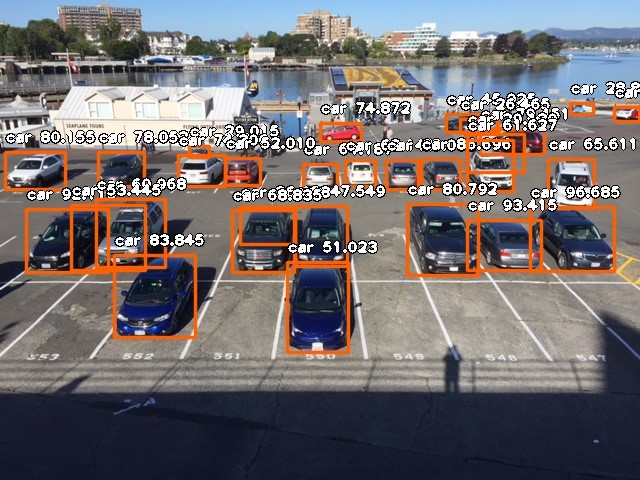
Park-smart is a parking solution that uses OpenCV computer vision library to detect full vs empty spots and provide that information on a row by row basis to solve the issue of motorists circling around a parking lot looking for a spot. This project is the 3rd year design project for Computer Systems Engineering at Carleton University. The members of the team are:
- Mattias Lightstone
- Josua Fryer
- Naomi Lui-Hing
- Dare Balogun
Architecture
This project consists of 4 distinct modules:
-
Arduino Contains the code for the display controller. This will power the lights, indicating the rows in the parking lot that are available, as well as power the lcd display which shows the total number of active spots. In addition it controls the ultrasonic sensors that detect a car’s entry to the parking lot. It receives it’s information to display through http communication with a rest api on the parking server.
-
CamerHub Contains the code for the camera hub, hosted on a raspberry pi. This module will control one or more cameras in order to take photos of the parking lot and send them to the parking server for processing.
-
Parking Server The central module that handles communication between the other three. This is a django application with two rest api endpoints for the arduino and camera hub to communcate with, a graphql endpoint for the webapplication to fetch data from. The Parking server also houses the database, which is currently just sqlite, but could be scaled up in a production environment. The web application can be accessed at the root index of the ip address of the server. ie. if the server address is 10.0.0.0:8000 the web app can be accessed by visiting http://10.0.0.0:8000/. The admin panel can be accessed at the /admin index.
-
Image Processor The Image processor is a simple rest api that receives an image from the parking server and returns a list of coordinates of cars in the image. It is recommended to be run on a machine with considerable computing power, as the imageprocessing requires significant overhead.
Installation:
Image Processor Node (RPi #1)
sudo apt-get update
sudo apt-get install python3-pip git libsm6 libfontconfig1 libxrender1 libxext6
python3.5 -m pip install --upgrade tensorflow
python3.5 -m pip install Django django-rest-framework graphene_django https://github.com/OlafenwaMoses/ImageAI/releases/download/2.0.2/imageai-2.0.2-py3-none-any.whl opencv-python keras pillow matplotlib
Clone the repo
git clone https://github.com/matt1light/monday-group4.git
Enter the repo
cd monday-group4/ImageAIServer
Download the resnet file
wget "https://github.com/OlafenwaMoses/ImageAI/releases/download/1.0/resnet50_coco_best_v2.0.1.h5"
Modify imageai
nvim /home/<username>/.local/lib/python3.5/site-packages/imageai/Detection/__init.py
add the following line above K.get_session()
K.clear_session()
Start the server
python3.5 manage.py run server 0.0.0.0:3000
Parking Server Node
On your parking server execute the following commands
sudo apt-get update
sudo apt-get install python3-pip git
Clone the repo
git clone https://github.com/matt1light/monday-group4.git
Enter the repo
cd monday-group4/parkingServer
Edit settings
gedit parkingServer/settings.py
Modify the IMAGE_PROCESSING_SERVER_IP to be the IP and port of the image processing server
Run the server on port 8000
python3.5 runserver 0.0.0.0:8000
LED Display Node (Arduino)
Hardware diagrams are shown at https://github.com/matt1light/monday-group4/arduino_hardware.png
Ensure to properly attach all components to the correct pins or the module will not work
Download the arduino IDE https://www.arduino.cc/en/Main/Software
Open the file EthernetHandling.ino
Change the line #define SERVERIP 10,0,0,41 to the ip address of the parking Server
Compile and flash the program onto the arduino
CameraHub Node (RPi #2)
A picam attatched to a raspberry pi is required for this module
sudo apt-get update
sudo apt-get install python3-pip git
Clone the repo
git clone https://github.com/matt1light/monday-group4.git
Enter the repo
cd monday-group4/CameraHub
Modify the ip address in Camera to the address of the parking server
Run the camerhub class
python3.5 CameraHub.py